

Documentation Index
Fetch the complete documentation index at: https://docs.provisionr.io/llms.txt
Use this file to discover all available pages before exploring further.
The Not So Nerdy Explanation
You know how an RFID ID badge at work gets you into the building, but not every room? Some doors you can open, some you can’t — it depends on your job. What about people who work from home, not in the office? They don’t have a badge, so how do they get access to company data in the cloud from their laptop or phone? We assume that you’ve seen theSign in with Google and Sign in with Microsoft buttons when you sign in to applications in the cloud. This is known as Single Sign-On (SSO), and acts as your virtual RFID badge in the cloud that lets you in the front door.
Provisionr is the proverbial virtual badge system for cloud applications that you use at work — we have rules and conditions to determine which employees should get access on their first day on the job.
User Experience in the Cloud
For most companies, employees use SSO to let users access a central dashboard of applications that they can access. When they click on the tile for that application, it redirects them to that vendor’s software and automatically authenticates them since they already authenticated with their SSO. Instead of rooms that you need to badge into, the dashboard tiles show you which applications (virtual rooms) you are authorized to get into. Provisionr handles the authorization part of the equation — who gets access to what — based on policies that define who should get access based on their job attributes. How many apps do you use in your job? 10? 20?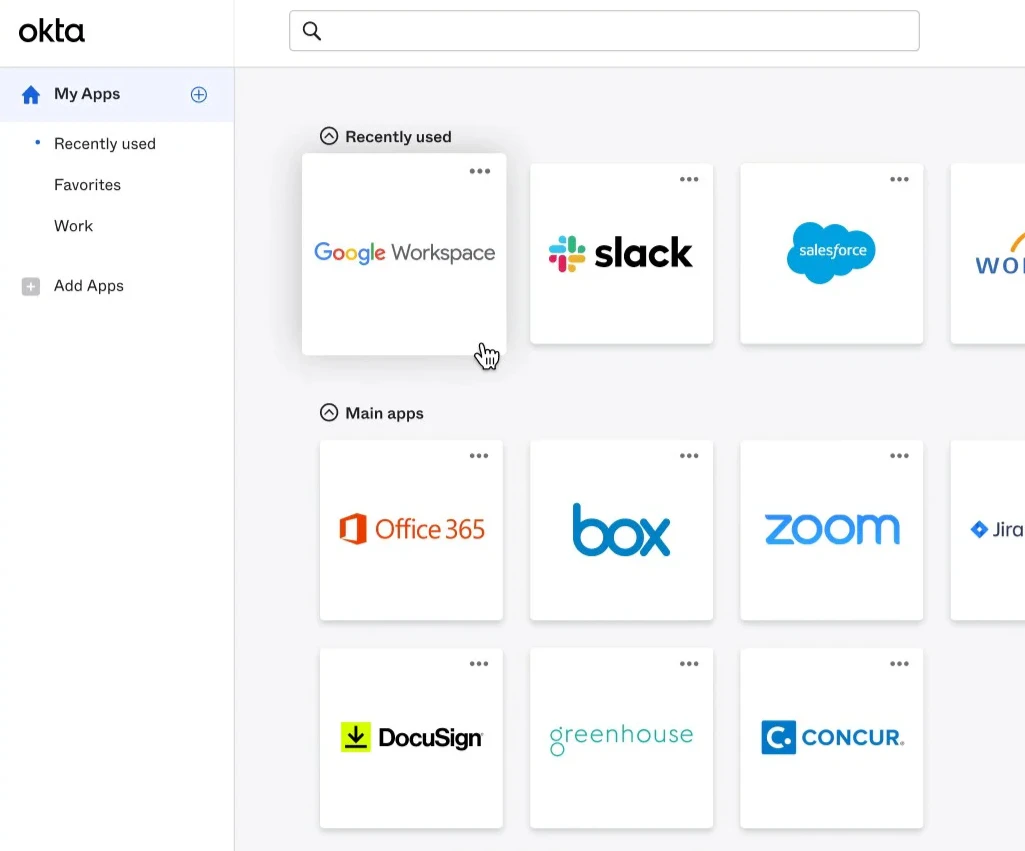
The Back Office Challenges
It’s not because IT is lazy or slow. It’s because the backoffice tooling is cumbersome, missing, or simply not built for this use case. IT and Security teams at small companies manage 20-50 applications. At large companies, that can easily grow from 300-1,000+ apps across departments and teams. Each job role should have a checklist of Day 1 access, but those checklists are often outdated, incomplete, or tribal knowledge in a manager’s head. With dozens or hundreds of checkboxes per employee, many IT Helpdesk teams spend a huge chunk of their day manually navigating UIs to add users to apps and groups, begrudgingly known as “click ops”. The automation should handle this, but the tooling to actually provision each checkbox has been a gap in the market. There are plenty of software vendors for managing access request tickets and approvals. Very few vendors handle what access you should have automatically on Day 1. We’re trying to help the IT and Security teams at companies that are stuck with manual processes or tools that treat all access the same — submit a request, wait for approval, repeat. Many system administrators have tried to fill the gaps with homegrown automation scripts, but those are brittle and hard to maintain. The result? At some companies, a new employee might submit 5 to 30 tickets in their first month to request access to applications, data, or systems they were told they need. They should have had that access on Day 1 or Day 2 if the IT checklist was up-to-date and the provisioning was automated. That’s where Provisionr comes in. Everyone should already have 90% of the access they need because we know what their job is. We automate that checklist using policies of who should get access based on one or more attributes in each employee’s profile data. If your attributes match all of these conditions, then we add you (the user) to the list of approved users on the policy. In other words, each of those SSO dashboard tiles has a set of rules (a.k.a. ruleset). A user will be granted access if they match all conditions for any one of the rules. That’s what policy-based access control (PBAC) is all about. If yourdepartment = Accounting and your job title is Accounts Receivable Analyst, you get access to the 2026 Invoices Google Drive folder and the NetSuite application tile.
Your sales team shouldn’t need to open a ticket to access the sales playbook. It should be governed by the rule that department = Sales, but it’s still a checklist that is manually provisioned by IT for every new Sales employee.
Who We Help
Have you heard of identity and access management (IAM), attribute-based access control (ABAC), or role-based access control (RBAC)? If that’s your world, you’re in the right place! We help HR Operations, IT Operations, Identity Engineering, IT Helpdesk, and Corporate Security teams at organizations using Google Workspace and/or Okta. Provisionr provides a back office platform to manage user membership policies for groups and resources across Infrastructure, IT, Platform, and Security systems that need more powerful group membership rules and policy-based access control (PBAC) to ensure least privilege for the downstream data, resources, or systems that they grant access to.If not, feel free to share this with your Identity, IT, Platform, or Security team.Hey! I came across this tool that might be helpful for you or your team. It talks about reducing access requests and implementing policy-based access control to automate group memberships across Google Workspace, Okta app assignments, Slack groups, and GitLab groups and projects. Thought you might find it interesting! Check out the docs athttps://docs.provisionr.io.
Problem Statement
Is onboarding and offboarding user provisioning painful? Do you despise the dozens of manual checklist boxes 😰 that you (or your team) have to take care of when someone joins your company or changes roles? There is a better way. 🥹 How many access requests do you receive each week from new hires that don’t have the access they need? Is this process painful for your team, your users, and the managers that are constantly asking for updates? 🤬There are more important things to do than handling access requests, adding and removing users from groups, or building and maintaining access request ticketing systems and homegrown provisioning scripts.Other vendors want to help you manage your existing access requests to ensure compliance requirements are met. What if we could reduce your access request volume by up to 90%? 🤩
Pain Points
Identity, IT, Infrastructure, Platform, and Security teams deal with these problems every day as they automate employee onboarding (joiners), job role changes (movers), and offboarding (leavers). The industry calls this the “joiner-mover-leaver” lifecycle. You might already have an Identity Engineering team, or maybe it’s just one person wearing multiple hats on your IT Helpdesk or Operations team.Manual Provisioning Overhead
Onboarding, offboarding, and role changes consume hours of admin time. Checklists are outdated, tickets pile up, users complain about wait times.
Access Request Bottlenecks
The process is slow and manual for everyone—requesters, approvers, and provisioners. Managers rubber-stamp approvals just to clear the queue.
Cross-System Sync
Keeping group memberships consistent across Okta, Google, Slack, GitLab, and other systems requires constant manual effort or brittle scripts.
Limited Integration Coverage
Identity providers don’t support enough of the stack, and no vendor covers the long tail of apps teams actually use.
Weak Rule Engines
Okta group rules can’t handle complex, multi-dimensional logic. Attribute changes in HRIS break string-matching rules and cause silent failures.
No Centralized Access Data
Without a unified view, teams are stuck with point-to-point automations, no approval audit trail, and no way to visualize or query access relationships.
Audit Gaps
Gathering compliance evidence is time-consuming, and not all systems are covered. Teams stitch together screenshots and exports.
Explore these topics in depth in Identity Foundations:
- Drowning in Access Requests — why most access requests shouldn’t exist
- Replace Manual Checklists — automating baseline entitlements
- Employee Role Changes — the mover problem is the biggest blind spot
- IdP Group Rule Sprawl — when string matching rules break down
- Cross-System Orchestration — managing access across multiple systems
- The Cost of Manual Provisioning — the real dollar cost
Where We Are Today
The best practice when using Google, Slack, GitLab, or Okta is to assign users to groups (similar to assigning to permission roles) and grant access to resources via those groups. The challenge is that this assignment is done manually and there are no good tools to define and enforce policies for who should belong to which groups based on rich user attribute metadata. The few options that exist are brittle string-matching rules that break as organizational complexity increases, or infrastructure-as-code techniques that have a policy definition but are still manually managed with configuration files in a Git repository. The missing piece is that there are no good system administrator tools for managing the groups and group members that grant access to these SaaS applications and their resources. As a result, managing user access and group memberships across Google Workspace, Okta, Slack, GitLab, and connected systems is manual, complex, and time-consuming.

The Access Request Treadmill
You likely hear that your Identity, IT, and Security teams are perpetually understaffed and deal with the risks from over-provisioned access and operational drag from manual workflows. An entire IT subindustry exists where people spend most of their workday provisioning access for employees and contractors. Ask any IT operations team how much time they spend on access requests, and the answer is usually “too much.” If it’s more than a few hours a week, you’re not alone.
We dive deeper into the access request problem in Drowning in Access Requests and break down the real dollar cost in The Cost of Manual Provisioning.
Lack of Centralized Control
How many tech stack tools does your company have? Most companies are using dozens or hundreds of SaaS applications today. Each of these applications has its own user database and way of managing access. The challenge is that there is no central way to define and enforce policies for who should belong to which groups and resources based on rich user attribute metadata. This exists in the Microsoft Entra ecosystem. Unfortunately, it’s scattered or missing entirely in the Google and Okta ecosystems. Your Identity Provider (IdP) has lightweight string matching group rules, but they break as organizational complexity increases, and there is no way to manage group memberships across multiple systems from a single place.The Gap in Identity Governance
Although Provisionr exists in the Identity Governance and Administration (IGA) space and we have enterprise-grade security and compliance features, we are not trying to solve the same problems that other IGA vendors are. We’ve been on the customer side evaluating and using IGA vendors for years. Every IGA vendor is good at what they focus on, ensuring that you have an auditable process for users to request access to the right resources at the right time while ensuring compliance. There is one question that always comes up:Where is the (modern) policy management for group rules?Group rules and policy management have a wider impact on role-based access control than most vendors seem to recognize. They forgot about the IT and Security System Administrator experience for defining and enforcing policies for who should belong to which groups and resources based on rich user attribute metadata. That’s where Provisionr comes in.
The Provisionr Solution
Provisionr provides a unified platform to define, manage, and automate user group memberships and access policies across Google Workspace, Okta, Slack, GitLab, and connected systems.

Key Capabilities
Provisionr automates Day 1 access provisioning by defining policies for who belongs to which groups, then uses those group memberships to grant access across the tech stack.Comprehensive User Directory
A unified directory aggregates user attributes from HRIS systems (like Workday or BambooHR), SSO providers (like Okta or Google Workspace), and other identity sources. Custom attributes define a single source of truth for teams, project assignments, clearance levels, and locations. Because the directory uses database relationships rather than string matching, users can belong to multiple teams without the brittleness of traditional group rules.
Multi-Dimensional Group Rules
Group membership rules use attribute-based access control (ABAC) principles with multi-dimensional logic and comprehensive database relationships with timestamps and state management. Instead of simple string matching, rules can combine multiple attributes—department AND location AND job level—to determine group membership.
Policy-Based Provisioning
A policy engine handles complex group membership rules and pre-approved access policies. Policies define what access is appropriate for each role, so provisioning happens automatically without per-request approvals.
Automated Provisioning
User provisioning and deprovisioning to groups and resources across multiple systems happens automatically based on defined policies. When user attributes change, group memberships update accordingly.
Least Privilege Access
Group memberships adjust dynamically based on user attributes and job roles, ensuring employees have the access they need—and only the access they need.
How It Helps
Business Value
- Replaces manual group member management with policy-based automation
- Keeps users in sync as HRIS/Okta attributes change
- Uses database relationships instead of brittle flat files
- Automated joiner/mover/leaver provisioning
User Experience
- Provisioning takes minutes, not days
- Users with the same role benefit immediately from policy updates
- Streamlined approvals via web UI and Slack notifications
Process Maintenance
- Reduces manual admin tasks through role-based automation
- Replaces access request tickets with pre-approved policies
- Custom API integrations handle non-Okta applications
Auditability
- Comprehensive logging of all approval and provisioning transactions
- Easy audit reports for compliance reviews across multiple filter criteria
Pricing Philosophy
We built Provisionr because we outgrew our scripts and couldn’t find a vendor that matched our vision or our budget. We don’t want you to reinvent the wheel for problems we’ve already solved and have to pay a vendor tens or hundreds of thousands of dollars for the compliance product that claims to solve it. Provisionr is built to work for companies of all sizes. You can start small with up to 20 groups for $20/mo, and expand as your needs evolve. We don’t have user seats, it’s simply $100/mo for every 100 policies (groups or resources) that you automate. With Provisionr, everyone can afford $1 per policy-managed group from organizations with 10 users up to 20,000+ users. See our policy control pricing for more details.Capabilities Quadrant
Our broader industry likes using quadrants to evaluate product maturity and vision. We’re too small to be included in Gartner or Forrester reports, however we wanted to share our own perspective on where we see ourselves today and where we are headed in the future.


Wrong Tool for the Job
Not every organization is a fit for Provisionr. Here are some common scenarios where Provisionr might not be a fit:- Microsoft Ecosystem: If your organization uses Active Directory or Entra ID predominantly, have a look at Entitlement Management. Provisionr is built for companies using Google Workspace and/or Okta.
- Simple Structure: If you have fewer than 5 departments and fewer than 50 users, Provisionr might be overkill. You can still use our baseline tier at $20/mo, especially if you appreciate the simplicity of Provisionr and want to automate things easily, however your environment is relatively static and you can easily solve this with a Terraform configuration.
- Limited Hiring: Provisionr is designed for organizations that onboard and offboard frequently — at least several per month, up to hundreds per week.
- On-Premise Applications: If your applications aren’t accessible from the Internet or lack REST APIs, Provisionr doesn’t have a way to integrate. If you already have your application integrated with Okta or Google Workspace SSO, Provisionr can manage group memberships in those systems.
- Government/Healthcare Compliance: We support ISO 27001, NIST, SOC1/2, and SOX. If you have FedRAMP, HIPAA, or public sector requirements, you’ll need a vendor built for that.
- 20,000+ Users: At that scale, you likely need 30-50% customization via Professional Services. Provisionr is 70% turnkey, 20% configurable, 10% gap. Consider SailPoint or Saviynt for enterprise-scale customization. Many larger organizations have smaller teams, departments, or business units that can use Provisionr though. We’ve seen it work well for Engineering teams or Sales organizations within large enterprises.
- Service Accounts: We are focused on managing human identities and access for employees, contractors, and 3rd party collaborators. If you need to manage service accounts or machine identities, consider a vendor built for that use case.
Why This Pain Exists
We are trying to treat the root cause of the problem, so let’s take a step back and understand why these problems exist in the first place.Origins of Microsoft Active Directory
In the “old days” before we used a variety of SaaS vendors to conduct business, we used Microsoft Active Directory to manage users, groups, and devices that were joined to the domain and usually on the same network. This centralized model works well when you have physical offices and your applications, devices, and users are using technologies in the Microsoft ecosystem. You simply signed into your computer with your username and password and your applications were on the same domain and internal network. We rarely or never needed to access work applications in a web browser, and the few that you did either used VPN or you had a username and password for that application that wasn’t the same as your Active Directory credentials. Remember those 8 character passwords that you had to remember in 2005 that required at least 1 number that you kept on a sticky note in your desk drawer or stuck to your monitor? 🫣

Growth of SaaS
The industry has evolved into a decoupled collection of web-based software-as-service (SaaS) applications. Each vendor now operates autonomously and since they are not federated with Active Directory, they maintain a database table of users that can access their application. For the most part, one application does not know how another application is configured or which users they share. Unlike the old days where you trusted that users were on the same network, you now have your business applications being accessed over the public Internet.Microsoft vs Google Ecosystem
If your organization uses Microsoft technologies predominantly including Active Directory or Entra ID (formerly Azure Active Directory), then there are many tools and vendors in the industry to help you administer and enforce policies for applications, policies, and group membership. Microsoft did a great job with Entra Identity Governance and Entitlement Management. If you use Entra, you’re in good hands. Provisionr is not going to boldly go where Microsoft has already gone. Not everyone uses Microsoft though. Over the last two decades, a minority yet still large percentage of organizations no longer (or never did) use Microsoft for their directory services or authentication since all of their applications are web-based and no longer need users to be joined to the domain. So who are these companies that don’t use Microsoft Active Directory or Entra ID (formerly Azure Active Directory)? 9+ million organizations are using Google Workspace. 17,000+ organizations are using Okta for identity management. That’s our Total Addressable Market (TAM). We built Provisionr for the companies that don’t have Active Directory and need powerful features for managing their users and their access. Our founders have been administrators of these platforms for years (Google since 2008, Okta since 2021), have built extensive automation using many different techniques, and that’s our laser-focused sweet spot that we believe will drive significant value for your organization and reduce your access requests. We’ve also used Slack, GitLab, and AWS for years, so we’ve built automation and integrations with those applications too.Next Steps
Start a Free Trial
Jump to the Launchpad and start provisioning today.
Pricing Plans
Explore our simple pricing plans based on $1 per managed group.
Learn the Identity Foundations
Dive deeper into the pain points that can be solved with policy-based access control.
Architecture Deep Dive
Learn more about the architecture concepts and security of Provisionr behind the scenes.